Workspaces & Settings
Manage your workspaces, team members, and organization settings.
Workspaces allow you to collaborate with your team, isolate different projects, and manage resources efficiently from a single user account.
What is a Workspace?
A Workspace is an isolated environment within the platform. Resources (like Virtual Machines, Kubernetes clusters, and Load Balancers), billing, and user access are scoped to the Workspace level.
By utilizing workspaces, you can easily separate internal environments (e.g., Staging vs. Production) or different client projects.
Managing Workspaces
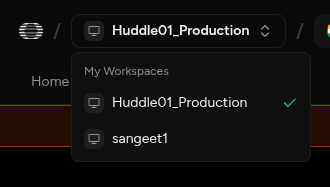
You can switch between Workspaces using the dropdown menu in the top-left corner of the dashboard sidebar.
Adding Team Members
To invite colleagues to your Workspace:
- Navigate to Settings from the bottom left of the sidebar while logged into the workspace.
- Go to the Members tab.
- Click "Invite Member" and enter their email address.
- An invitation email will be sent. Once they accept, they will have access to the resources within that specific Workspace.
Workspace Settings
Within the Settings menu, you can configure several aspects of your workspace:
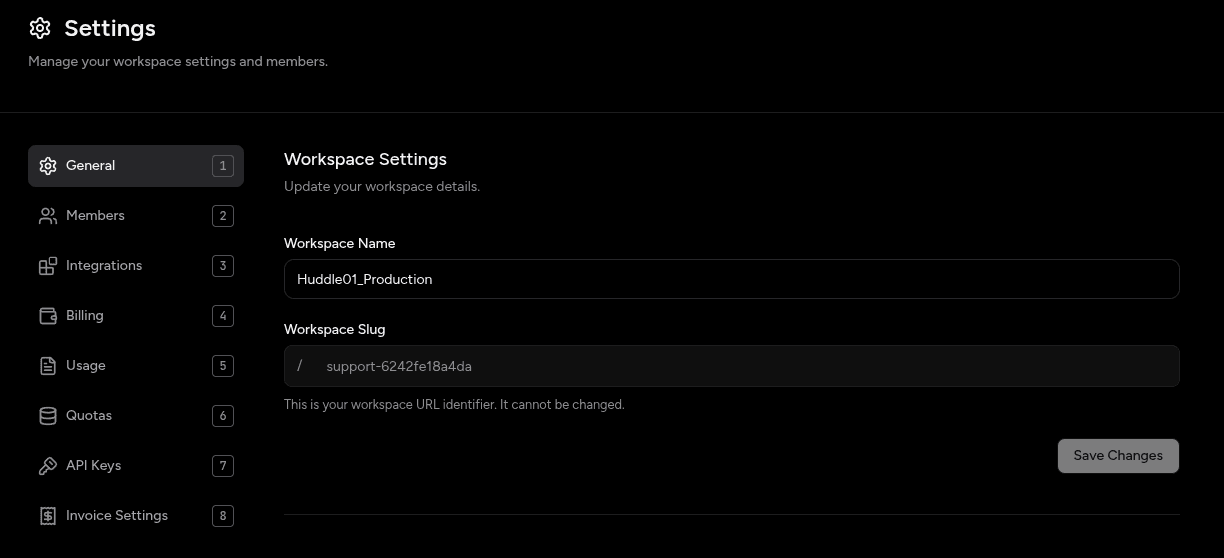
- General: Rename the workspace or update the workspace slug.
- Members: View pending invitations and manage existing member roles.
- Security: Configure SSH Keys or access policies specific to the workspace.
- Billing: Manage payment methods, view invoices, and set billing alerts specific to this workspace's resources. (Note: Billing is per-workspace).
Warning
Deleting a Workspace is a permanent action. All resources attached to the workspace will be terminated immediately. Ensure all critical data is backed up before confirming a deletion.